max_wal_size
One of the primary tunables for PostgreSQL is how much disk space is provided for the 16MB Write-Ahead Log file segments, set by the max_wal_size GUC.
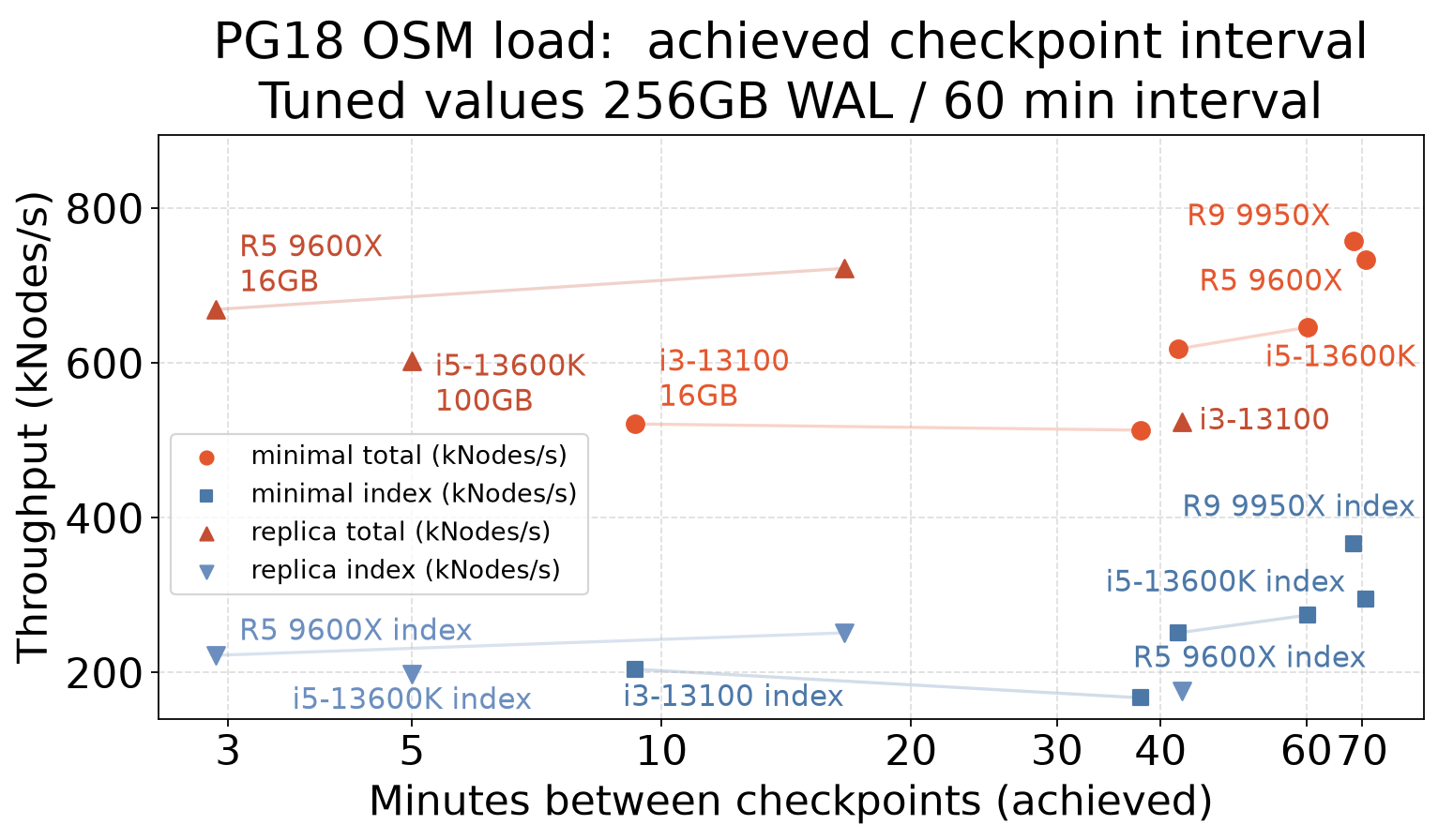
WAL recovery is fastest when previously used WAL files are recycled for each checkoint. On a fresh cluster, the files won’t be there yet. The server will have to create the file set for the first time, then start recycling them once there’s no active checkpoint using them. Recycling happens from files left behind by a previous checkpoint. That means the disk space figure you provide will roughly be cleaved in half for the checkpoint cycle.
To function as designed, creating new WAL files requires they be fully written out full of zeroes, a 16MB write, and then that write confirmed on disk using your system’s sync call (fsync etc.) That’s only way the recovery code can deal with the short writes that crashes tend to leave behind. The sync to disk means WAL files are expensive to create, sometime stuck behind massive writes in the disk queue. Systems hitting checkpoints too fast will see everyone is waiting around. with writers all get stuck behind whatever process is extending the size of the latest WAL files needed.
When the server hits the max_wal_size limit for the number of WAL files it’s allowed to create, it has to request a checkpoint to clean things up. That’s why adding more WAL space is doubly useful. It avoids needing to create new WAL files, and it keeps checkpoints from happening too fast. There’s a configurable warning written to the logs if you hit the usual path that shows you’re running checkpoints too fast. It’s defined by faster than 30 seconds by default:
$ grep checkpoint_warning $PGDATA/postgresql.conf
#checkpoint_warning = 30s		# 0 disables
$ tail /var/log/postgresql/postgresql-17-main.log
2024-10-25 11:51:28 EDT [102359]: LOG:  checkpoints are occurring too frequently (27 seconds apart)
2024-10-25 11:51:28 EDT [102359]: HINT:  Consider increasing the configuration parameter "max_wal_size".
Note that in older guides, the parameter used to be named Checkpoint Segments, because of what the implementation does. It made more sense to express the setting as a disk space limit.
OSM Results
The Open Street Map loading workload is a good fixed size test of checkpoint write volume. A study of different values is in the OSM Checkpoint results (Streamlit explorer — down between releases).
Every example there tries to delay checkpoints to an hourly timeframe. If you compare the chkp_mins column there, that shows how fast checkpoints actually execute. There are two main configurations being compared:
- Minimal WAL: 15-20MB/s of WAL writes. A new 16MB WAL segment appears every second.
- Replica WAL: 50-60MB/s of WAL writes. That’s 3-4 WAL segments every second.
At that rate, you need to buffer a lot of WAL files into max_wal_size to postpone checkpoints very long. Here’s a high level summary of typical samples there:
| wal_level | max_wal_size | chkp_mins |
|---|---|---|
| minimal | 16G | 9.3 |
| minimal | 100GB | 37.5 |
| minimal | 256GB | 68.4 |
| replica | 16G | 2.9 |
| replica | 100GB | 16.6 |
| replica | 256GB | 42.5 |
See the checkpoint_tuning page for a detailed analysis of this data and how to generate similar figures for your own database.
You can see that in the starter config where max_wal_size=16GB, the server was sometimes hitting the limit in under 3 minutes. So even though I wanted hourly checkpoints, I didn’t have enough WAL file space to handle it.
Performance gains continued as I kept increasing the max_wal_size parameter to a setting of 256GB. At that point speed increased stopped because checkpoint were always on an correct hourly schedule, triggered by the timeout instead of the size limit being reached.
As much as everyone would like a tuning tool to do all this, it’s hard to just compute a value here once and be done. Since checkpoints become more efficient as this tunable goes up, there’s some dynamic feedback to the setting. It would be nice if there was a one-time computation to figure out the optimal setting, but reality says this takes a feedback tuning process instead.
Downsides
There are downsides to just making this value huge even if you have plenty of space. You should consider your candidate max_wal_size as a percentage of memory, and if that’s over 20% of RAM it’s probably too high. This sample OSM data is comically overtuned, the servers have 128GB of RAM, and that only works out because this a bulk loader rather than an interactive benchmark.
In production very large max_wal_size values can be problematic because they interfere with caching more useful data. While Postgres tries to use cache avoiding methods to write the WAL data such as Direct I/O, there’s always some amount of cache pollution from them.
Reducing max_wal_size cleanup
Here’s a cluster tuned with the max_wal_size=256GB setting–disk space is cheap, right?–after a few loads and updates to a data set that’s 24GB in size:
$ cd $PGDATA
$ watch "du -sh pg_wal base/ && ls -l pg_wal | wc -l"
257G    pg_wal
24G     base/
16385
Maybe fine but the dat you need to move the cluster, you’ll realize every WAL byte needs to be duplicated. And there’s no easy fix. Cleaning this mess up is tricky.
When you drop max_wal_size to a lower value, it doesn’t throw away the extra WAL files immediately. It removes a few each time there’s a checkpoint:
2024-10-25 10:45:20 EDT [102359]: LOG: checkpoint complete: wrote 135 buffers (0.8%); 0 WAL file(s) added, 336 removed, 0 recycled; write=23.353 s, sync=15.299 s, total=40.346 s; sync files=63, longest=2.561 s, average=0.243 s; distance=5506531 kB, estimate=6432075 kB; lsn=98C/25369FC0, redo lsn=98A/E840DD80
That’s 2% cut down each pass. The OSM test systems normally run with hourly checkpoints. Let’s say I change that to a 5 minute checkpoint_timeout. Projecting that forward suggests it would take 5/2% = 250 minutes before the WAL was smaller.
Unfortunately the problem is even worse than that. Checkpoints and therefore recycling only happen if there’s activity during each period!
There’s an optimization in the checkpoint code that disables checkpoints on idle systems. If there hasn’t been some activity since the last checkpoint, as measured by the WAL moving forard, no checkpoint is triggered. Just waiting will never fix this problem. There has to be activity to force this gentle recycling code into action to reclaim the disk space.
Experts only: manual archive cleanup
There are ways to force WAL to clean up by truncating it. The tools to do that dangerous enough that even experts can easily still make a mistake and blow up a server using them. And unless you have full command line access to your server’s OS, you won’t have access to them anyway. Here’s what a successful cleanup command line looks like:
$ pg_archivecleanup /var/lib/postgresql/17/main/pg_wal 0000000100002AF20000006A
Forcing trickle WAL space reduction
What you can do to slowly trickle the WAL files away is generate a ton of activity to force plentiful checkpoints. That’s not necessarily a good solution for a production system with this problem. The amount of activity needed is going to write a ton of WAL data out, and if there’s a replica all those writes will hammer it and the network too. It’s better if you can just tolerate it taking a few days for the size to slowly come down with regular activity.
Let’s walk through an example of trying to speed run the 256GB reclaim on this test system. I was able to recycle all my files by adjusting down to max_wal_size=10GB, then spending about two hours with pgbench running in a loop:
$ while [ 1 ] ; do
> pgbench -i -s 1000 -p 5433
> done
I left the watch command I showed above running in a terminal to track the progress. Here’s the first 1/3 done:
$ watch "du -sh pg_wal base/ && ls -l pg_wal | wc -l"
174G    pg_wal
24G     base/
11087
And then fully cleaned up:
$ du -sh pg_wal base/ && ls -l pg_wal | wc -l
11G     pg_wal
39G     base/
643
$ tail /var/log/postgresql/postgresql-17-main.log
2024-10-25 13:27:20 EDT [102359]: LOG:  checkpoint complete: wrote 53 buffers (0.3%); 0 WAL file(s) added, 0 removed, 52 recycled; write=5.247 s, sync=0.053 s, total=5.874 s; sync files=48, longest=0.016 s, average=0.002 s; distance=838412 kB, estimate=5750049 kB; lsn=9F5/B10DD1C8, redo lsn=9F5/B10DD138