checkpoint_timeout
Checkpoints are the background heartbeat of every PostgreSQL database. When a checkpoint finishes, you have a consistent snapshot of the database’s internal state at a point in time. While always running, they only make note of themselves only via a cryptic summary every 5 minutes that one of then finished. Periods without activity don’t trigger checkpoints.
The standard tuning practice for checkpoint_timeout follows this workflow:
- Increase
checkpoint_timeoutfrom 5 minutes to 10 minutes. - If the time between checkpoints doesn’t actually change much, you probably need to increase
max_wal_sizeas well or instead of the timeout. - As volume increases continue stepping the timeout up to 15 and then 30 minutes.
- Consider even higher settings during bulk-loading stages. You can tune the value easily without restarting the server. You just need to write a new setting and reload the configuration.
Older PG versions limited the timeout to 60 minutes. Current ones let you postpone checkpoints up to once per day.
Timeout theory
When checkpoints happen too often, the whole process of writing out data becomes less efficient. The busiest blocks in your database, they’re written to all the time. The optimal strategy is to only write those blocks during the checkpoint. Then you only do that write once per checkpoint cycle. The database has stategies it uses to preserve functional space in the database’s internal cache, to try and delay writes as long as possible. If you make it to another checkpoint without having a block of data leave shared_buffers, you only have to write it once per cycle.
In many write-heavy benchmarks, the optimal strategy then is to delay checkpoints as long as possible. To keep that from going too wild, benchmark fairness specifications will lock the upper limit to something reasonable. Decades ago the TPC-C benchmark used 30 minutes as that number, and a lot of Postgres tuning guides still mirror that guideline.
That’s for benchmarking though. In the real world, recover time after a system crash matters too. And if it’s been 30 minutes since your last checkpoint when you crash, it could take quite a while to recover from a crash, and that’s database server downtime. It will probably take less than 30 minutes because WAL playback can happen faster than real time. But there are bottlenecks and limits to the process; it can easily stretch into a number of minutes. That’s why the out of the box setting is the 5 minutes setting. It doesn’t gobble disk space as fast and there’s lower odds of a many minute outage after a bad crash.
OSM Results
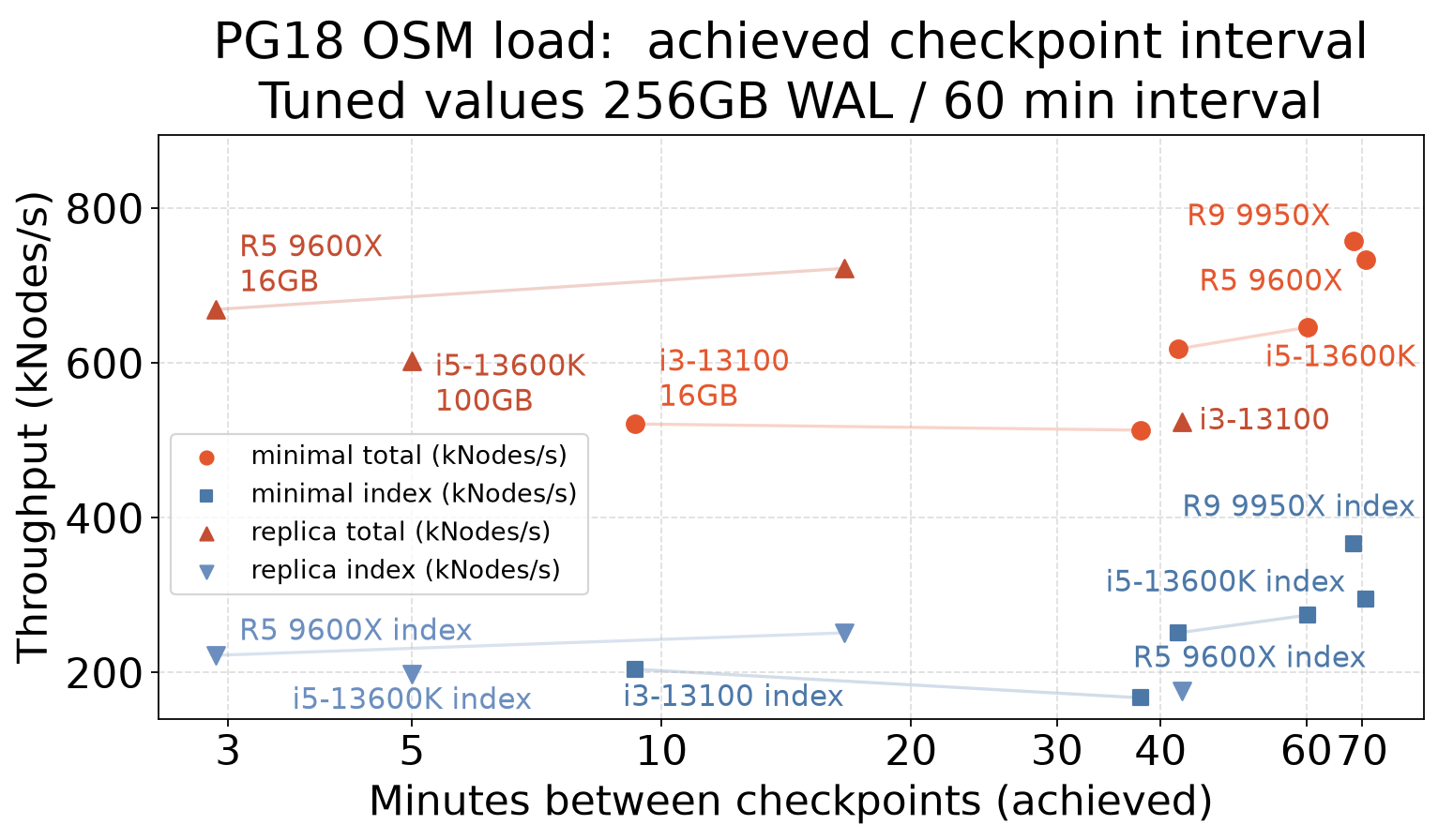
The Open Street Map loading workload is a good fixed size test of checkpoint write volume. A study of different values is in the OSM Checkpoint results (Streamlit explorer — down between releases).
Like the TPC-C, loading always gets faster with more space between checkpoints. Accordingly the checkpoint_timeout has been set to the old maximum of 60 minutes on the test servers.
If you compare the chkp_mins column there, that shows how fast checkpoints actually execute. There are two main configurations being compared:
- Minimal WAL: 15-20MB/s of WAL writes. A new 16MB WAL segment appears every second.
- Replica WAL: 50-60MB/s of WAL writes. That’s 3-4 WAL segments every second.
At that rate, you need to buffer a lot of WAL files into max_wal_size to postpone checkpoints very long. Here’s a high level summary of typical samples there:
| wal_level | max_wal_size | chkp_mins | Checkpoint GB/hour |
|---|---|---|---|
| minimal | 16G | 9.3 | 7.6 |
| minimal | 100GB | 37.9 | 6.4 |
| minimal | 256GB | 68.4 | 3.5 |
| replica | 16G | 2.9 | 34.4 |
| replica | 100GB | 16.6 | 27.6 |
| replica | 256GB | 42.5 | 12.0 |
Rate estimation and tuning process
Checkpoint writes seem like a trickle, often 1 or 2MB/s. The better unit to look at how many GB/hour are being written.
The above OSM numbers set shared_buffers=48GB. When that is being written once per hour in the minimal/256GB WAL configuration, that’s 48GB/hour. That’s a moderate checkpoint write rate.
The 16GB max_wal_size examples show a much more brutal rate. At every 9.3 minutes, that’s about 6 checkpoints/hour writing ~50GB each, or 300GB/hour. That’s crippling on this server.
To get the server back on track, instead of 6 checkpoints/per hour the goal was to get 1. To try and reach that, max_wal_size was increased by a factor of 6, to 100GB. Even that 100GB setting didn’t quite reach the timeout goal; you don’t get a perfect efficiency gain with this tuning. The actual number ending up being max_wal_size=256GB before checkpoints would run on an hourly schedule.
Cutting down on these extra writes helps the disks live longer too. When a write is unlucky on page alignment, an 8K write can take two flash cell erasures before it commits. That’s both slow and it wears the SSDs out faster too.
Measuring checkpoint rate and write volume
To see metrics like these examples on your own server, you can query the internal pg_stat_bgwriter view and compute elapsed values. These example queries are designed to run in -x or \x expanded mode. Since the internals changed in PG17, there are two different queries you might need.
The timeout_accuracy results is intended to be a 0-100% readout. For turning that into a priority level for purposes like alerting, under 50% is bad, under 20% critical and very likely to benefit from tuning.
If your server has been running for years, you may want to follow the reset procedure below and collect fresh data a few days later. That’s the recommended practice for major changes too.
PG 17+ checkpoint accuracy report
SELECT
  date_trunc('day',stats_reset)::date AS reset,
  date_trunc('day',current_timestamp)::date AS now,
  substring(version(),1,16) AS server_ver,
  pg_size_pretty(pg_database_size(current_database())) AS dbsize,
  (SELECT pg_size_pretty(setting::int8 * 8192) FROM pg_settings WHERE
    pg_settings.name='shared_buffers') AS shared,
  (SELECT setting FROM pg_settings WHERE
    pg_settings.name='fsync') AS fsync,
  (SELECT pg_size_pretty(pg_settings.setting::int8 * 1024 * 1024) FROM pg_settings WHERE
    pg_settings.name='max_wal_size') AS max_wal_size,
  (SELECT pg_settings.setting::integer / 60 FROM pg_settings WHERE
    pg_settings.name='checkpoint_timeout') AS timeout,
  round(extract(epoch from (current_timestamp - stats_reset)) / (num_timed + num_requested) / 60) AS chkp_mins,
  pg_size_pretty(round(60*60*buffers_written * 8192 / extract(epoch from (current_timestamp - stats_reset)))::bigint) AS chkp_bytes_hour,
  pg_size_pretty(round(buffers_written * 8192 / extract(epoch from (current_timestamp - stats_reset )))::bigint) AS chkp_bps,
  60*60*(num_timed + num_requested) / extract(epoch from (current_timestamp - stats_reset))::bigint as chkp_per_hour,
  num_timed + num_requested AS chkpts,
  num_timed AS timed,num_requested AS req,
  round(extract(epoch from (current_timestamp - stats_reset)) / (num_timed + num_requested) / 60,1) as min_per_chkp,
	  LEAST(100,round(100*
    (extract(epoch from (current_timestamp - stats_reset)) / (num_timed + num_requested) / 60) /
      (
      SELECT setting::integer / 60 FROM pg_settings WHERE
        pg_settings.name='checkpoint_timeout'
      ),0))
    AS timeout_accuracy,
  round(100*num_timed / (num_timed + num_requested),0) AS chkp_timed_pct
FROM pg_stat_checkpointer
WHERE
  extract(epoch from (current_timestamp - stats_reset))::bigint > 0
 AND (num_timed + num_requested) > 0
;
PG 16 and earlier checkpoint accuracy report
SELECT
  date_trunc('day',stats_reset)::date AS reset,
  date_trunc('day',current_timestamp)::date AS now,
  substring(version(),1,16) AS server_ver,
  pg_size_pretty(pg_database_size(current_database())) AS dbsize,
  (SELECT pg_size_pretty(setting::int8 * 8192) FROM pg_settings WHERE
    pg_settings.name='shared_buffers') AS shared,
  (SELECT setting FROM pg_settings WHERE
    pg_settings.name='fsync') AS fsync,
  (SELECT pg_size_pretty(pg_settings.setting::int8 * 1024 * 1024) FROM pg_settings WHERE
    pg_settings.name='max_wal_size') AS max_wal_size,
  (SELECT pg_settings.setting::integer / 60 FROM pg_settings WHERE
    pg_settings.name='checkpoint_timeout') AS timeout,
  round(extract(epoch from (current_timestamp - stats_reset)) / (checkpoints_timed + checkpoints_req) / 60) AS chkp_mins,
  pg_size_pretty(round(60*60*buffers_checkpoint * 8192 / extract(epoch from (current_timestamp - stats_reset)))::bigint) AS chkp_bytes_hour,
  pg_size_pretty(round(buffers_checkpoint * 8192 / extract(epoch from (current_timestamp - stats_reset )))::bigint) AS chkp_bps,
  60*60*(checkpoints_timed + checkpoints_req) / extract(epoch from (current_timestamp - stats_reset))::bigint as chkp_per_hour,
  checkpoints_timed + checkpoints_req AS chkpts,
  checkpoints_timed AS timed,checkpoints_req AS req,
  round(extract(epoch from (current_timestamp - stats_reset)) / (checkpoints_timed + checkpoints_req) / 60,1) as min_per_chkp,
  LEAST(100,round(100*
    (extract(epoch from (current_timestamp - stats_reset)) / (checkpoints_timed + checkpoints_req) / 60) /
      (
      SELECT setting::integer / 60 FROM pg_settings WHERE
        pg_settings.name='checkpoint_timeout'
      ),0))
    AS timeout_accuracy,
  round(100*checkpoints_timed / (checkpoints_timed + checkpoints_req),0) AS chkp_timed_pct
FROM pg_stat_bgwriter
WHERE
  extract(epoch from (current_timestamp - stats_reset))::bigint > 0
 AND (checkpoints_timed + checkpoints_req) > 0
;
Checkpoint metrics reset procedure
After making any change to the checkpoint tuning, the long-term history shown in this report will not be as useful
The standard approach is to save a copy of the raw data:
SELECT now(),* FROM pg_stat_bgwriter();
And then reset the internal counters, eliminating all the old checkpoint data so that doesn’t pull down the averages:
SELECT pg_stat_reset_shared ('bgwriter');
The main risk that may make this unavailable is when there’s a monitoring tool looking at background writer/checkpoint activity. Resetting the values will result in the tool seeing negative numbers for a moment.